11 — Representative Health and Compliance Status
The Red/Amber/Green (R/A/G) health system provides an at-a-glance compliance status for every licensed representative in your organisation. It is computed server-side on every request, based on two data sources: Capital Markets and Financial Advisory Services (CMFAS) module status records and Continuing Professional Development (CPD) hour records. The result is surfaced as a coloured pill badge throughout the platform and in the AI assistant's responses.
Every compliance decision in this system is grounded in published MAS regulatory text. The thresholds used are drawn directly from MAS Notice FAA-N26 (the current competency notice for Financial Adviser representatives, in force since 1 April 2024, superseding FAA-N13 on the competency side).
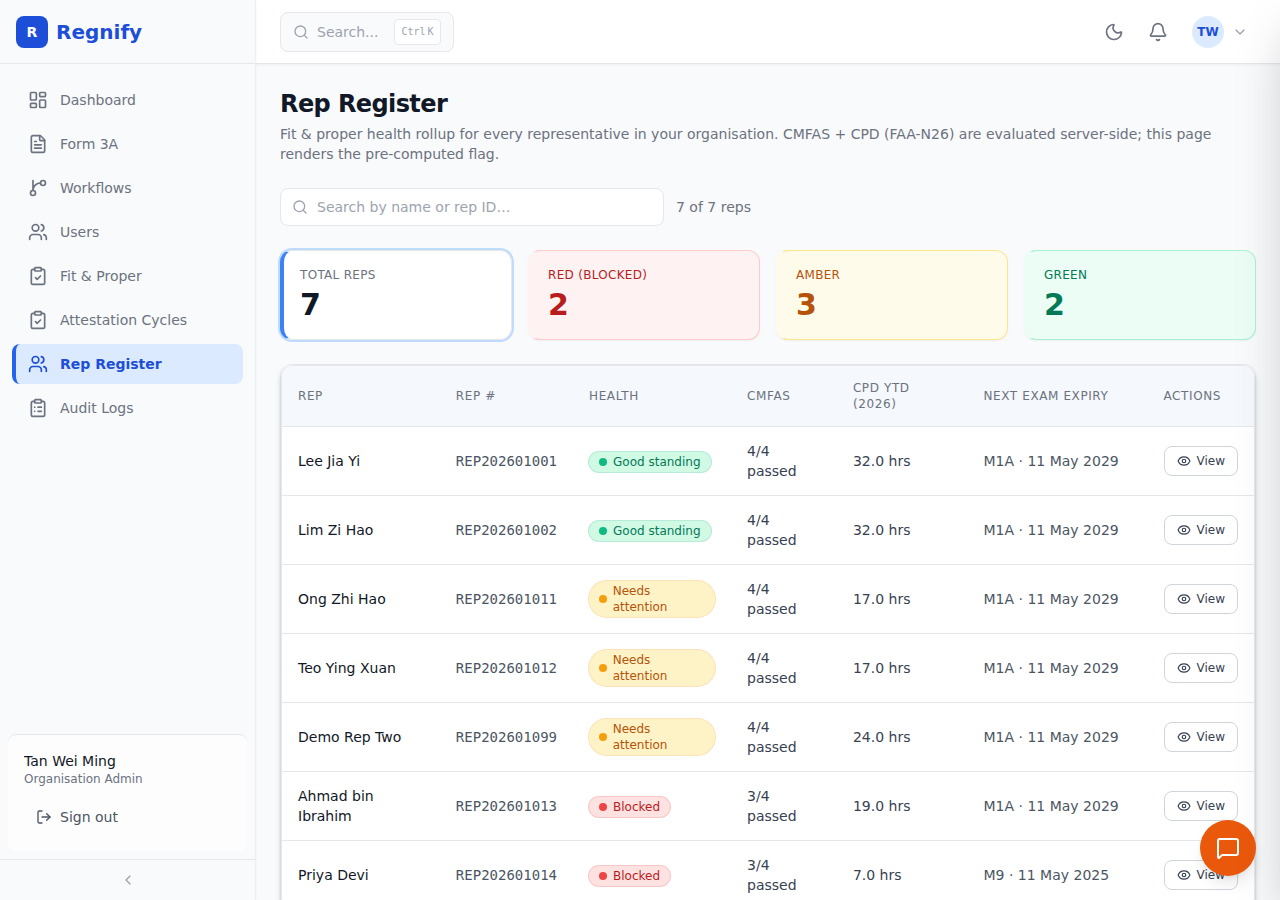
The full Rep Register (compliance officers and admins) is at /admin/rep-register. Each row shows the rep's REP #, a coloured Health badge, CMFAS module pass count (e.g. 4/4 passed or 3/4 passed), CPD YTD hours, and next-exam expiry. When a rep is flagged AMBER or RED, the badge is paired with a plain-language reason computed from the same FAA-N26 thresholds — for example "CPD shortfall (FAA-N26 2026): CPD total 17.0/30 hrs, product 0.0/4 hrs" or "CMFAS modules not in good standing: M9 (expired)". The intent is that nothing is hidden behind a colour; the rule that fired is always visible.
Understanding the Three Health States
The health rollup follows a strict precedence rule: CMFAS status is checked first; CPD status is checked second. A representative who fails the CMFAS check is always RED, regardless of CPD standing.
GREEN — Good Standing
Displayed as: Green pill, label "Good standing."
The representative meets all requirements:
- All CMFAS modules they carry are in passed status, and none have an expiresAt date in the past.
- CPD for the current calendar year meets all three FAA-N26 minima (source: services/nestjs/src/domain/rep-profile/rep-profile.service.ts, lines 29–31):
- Total CPD hours >= 30 hours (CPD_ANNUAL_MINIMUM_HOURS)
- Ethics and regulations hours >= 8 hours (CPD_ETHICS_MINIMUM_HOURS)
- Product knowledge hours >= 4 hours (CPD_PRODUCT_MINIMUM_HOURS)
A GREEN representative requires no immediate action. Review periodically to ensure CMFAS modules remain current and hours are being logged through the year.
AMBER — Needs Attention
Displayed as: Amber/yellow pill, label "Needs attention."
The representative's CMFAS modules are all in good standing, but their CPD hours for the current cycle year fall below at least one of the three FAA-N26 minima. The health rollup logs the specific shortfall(s):
- Example reason: "CPD shortfall (FAA-N26 2026): CPD total 14.5/30 hrs, ethics 3.0/8 hrs"
- Example reason: "CPD shortfall (FAA-N26 2026): ethics 6.5/8 hrs"
An AMBER representative is not yet in breach — CPD is measured against the annual cycle (1 January to 31 December). However, AMBER status warrants monitoring and, as the year end approaches, proactive outreach. The AI assistant's draft_cpd_reminder tool is the direct action to take for AMBER representatives.
RED — Blocked
Displayed as: Red pill, label "Blocked."
The representative has at least one CMFAS module that is not_taken, failed, or expired. The health rollup logs the specific modules and their status:
- Example reason: "CMFAS modules not in good standing: M6A (not_taken), M5 (expired)"
A RED representative cannot legally act as a representative for the activities covered by the failing modules. They must re-take and pass the relevant CMFAS examination(s) before those activities can be conducted. This is an immediate action item for the representative and their principal Financial Institution.
Note on expiry: A
passedCMFAS module with anexpiresAttimestamp in the past is treated asexpiredby the health rollup, even if the stored status field still readspassed. This belt-and-suspenders check catches stale data from the cert analyser and ensures the health flag reflects the actual current standing.
How the Health Rollup Is Computed
The health rollup runs in services/nestjs/src/domain/rep-profile/rep-profile.service.ts, method computeRepHealth (lines 179–268). The computation for each representative:
- Fetches all
CmfasModuleStatusrows for the rep from thecmfas-statusdomain service. - Fetches CPD hour totals (ethics, product, other, total) from the
cpd-recorddomain service, aggregated for the current UTC calendar year. - Checks each CMFAS module status. Any status in
{not_taken, failed, expired}setshasMissingRequired = trueand collects the module codes and statuses. - Checks each of the three CPD minima against the FAA-N26 constants. Shortfalls are collected as descriptive strings.
- Derives the final flag: RED if
hasMissingRequired; AMBER if CPD shortfalls but no missing modules; GREEN if neither. - Returns a
RepHealthSummaryobject including the flag, the reason strings, all CMFAS module details, and CPD breakdown.
This computation is deterministic — no LLM call is involved. The published FAA-N26 thresholds are closed specifications (not semantic judgements), and applying them deterministically is correct per the project's engineering standards. The AI assistant's get_rep_register tool uses a separate LLM-based classification for the conversational health flag, which weighs CMFAS and CPD signals holistically — that is the narrative path, not the admin register path.
The Rep Register Page
The Rep Register page (/admin/rep-register) is the primary compliance view for Org Admins, HR Admins, and Compliance Officers.
Access roles: ORG_ADMIN, HR_ADMIN, COMP, SYS_ADMIN.
Route: /admin/rep-register
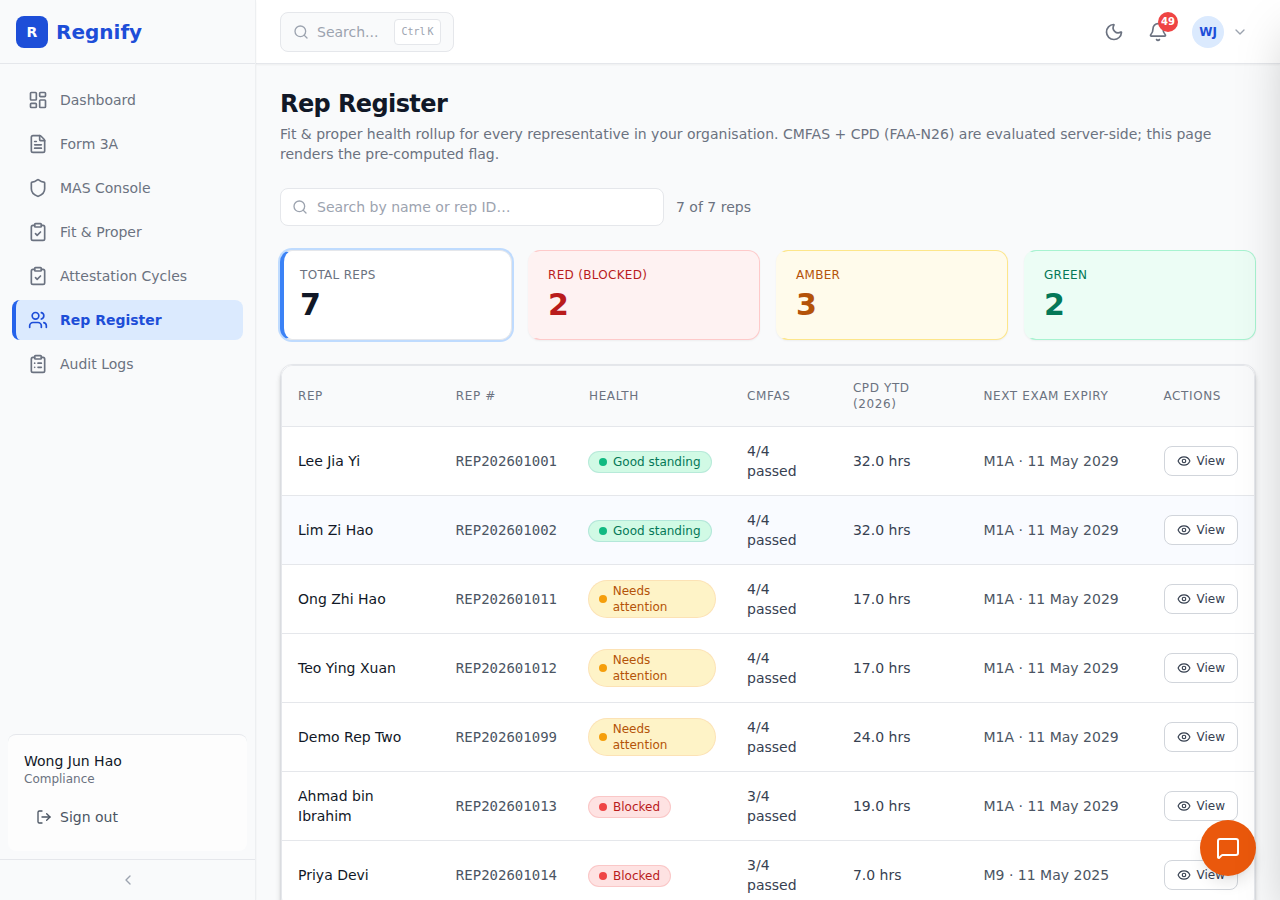 The Rep Register showing 7 representatives: 2 RED badges (Ahmad bin Ibrahim at 19 ethics hours, Priya Devi at 7 ethics hours — both below the 30-hour total threshold and blocked from regulated activities), 3 AMBER, and 2 GREEN (Lee Jia Yi and Lim Zi Hao both at 32 hours, exceeding the 30-hour threshold).
Page Layout
At the top of the page, four summary tiles show: - Total reps — total representative count for your organisation - Red (blocked) — count of representatives requiring immediate action - Amber — count of representatives needing CPD attention - Green — count of representatives in full compliance
These counts are computed client-side from the server's pre-computed healthFlag values. No re-classification happens on the client.
The Register Table
The table shows one row per representative with the following columns:
| Column | Description |
|---|---|
| Rep | Representative's display name (from their user record) |
| Rep # | The representative number from their RepProfile record |
| Health | The R/A/G badge pill (colour + label) |
| CMFAS | Summary of passed modules (e.g. "3/4 passed") |
| CPD YTD | Total CPD hours year-to-date for the current cycle year. Hovering shows the breakdown: ethics hours / product hours / total. |
| Next exam expiry | The soonest CMFAS module expiry date across all the rep's modules, with the module code. Shows "—" if no modules have expiry dates. |
Health badge tooltip: Hovering over a health badge shows the specific reasons computed by the server — for example, "CMFAS modules not in good standing: M5 (expired)" or "CPD shortfall (FAA-N26 2026): CPD total 22.0/30 hrs, ethics 5.0/8 hrs."
The Three Badge States
The register displays all three health states simultaneously in a single table — there is no filtered single-state view.
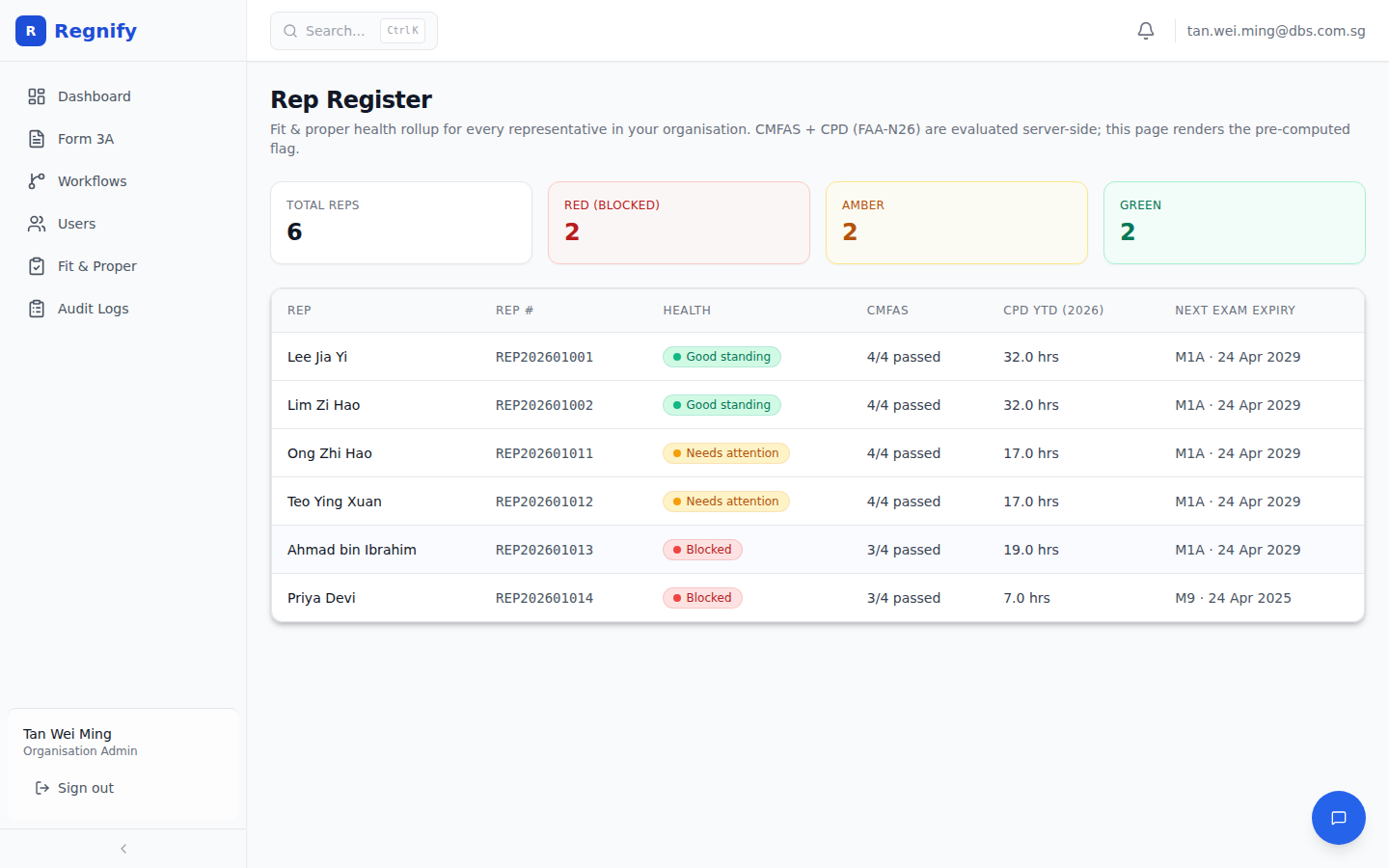 A RED representative row. RED fires when at least one CMFAS module is
 not_taken, failed, or expired — regardless of CPD standing. The badge tooltip shows the specific modules and their statuses. The representative is blocked from conducting the regulated activities covered by those modules until they re-take and pass the relevant CMFAS examination(s).
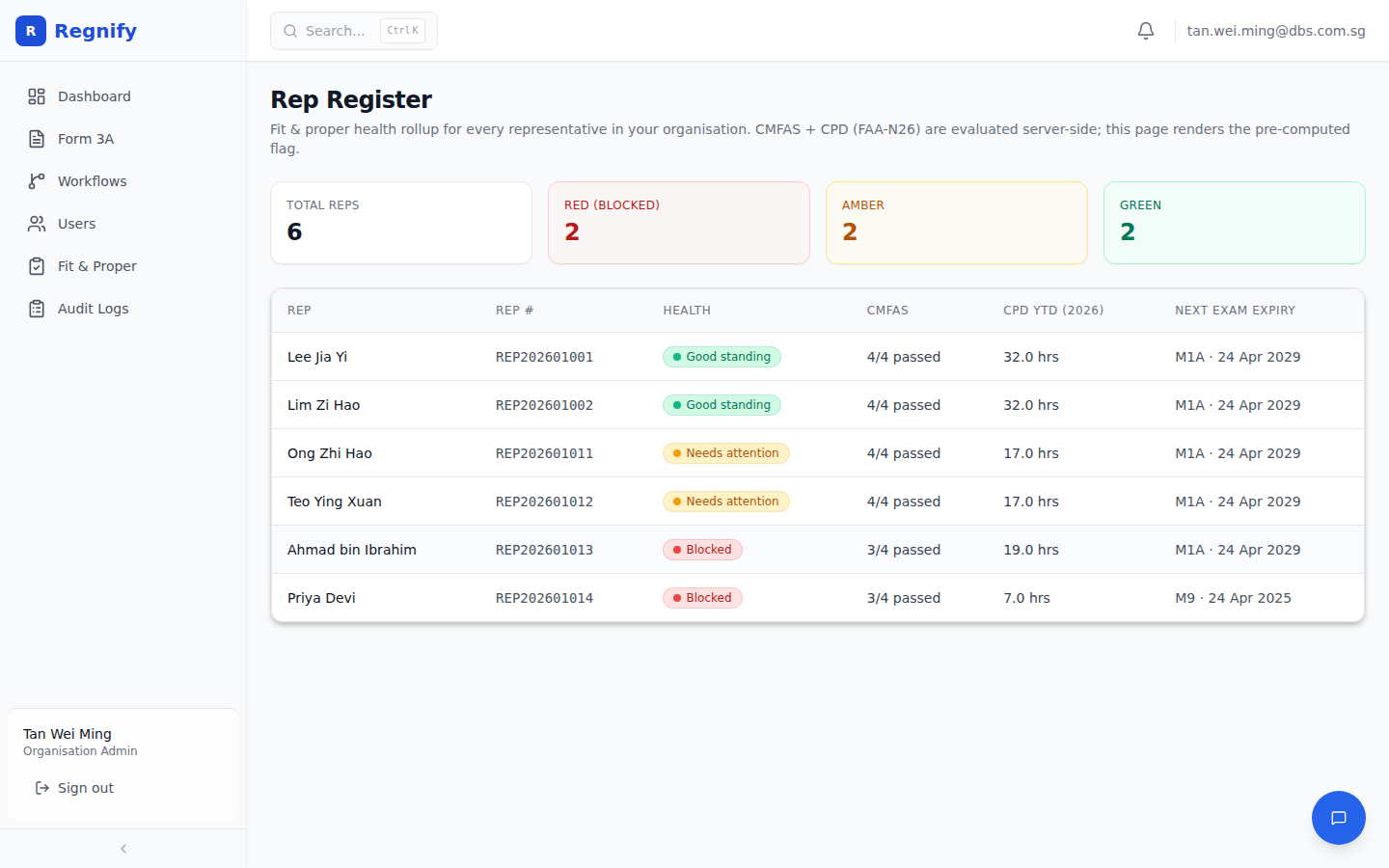 An AMBER representative row. AMBER fires when CMFAS modules are all in good standing but CPD hours for the current cycle fall below at least one FAA-N26 minimum: total below 30 hours, ethics below 8 hours, or product knowledge below 4 hours. The representative is not yet in breach — CPD is measured against the full calendar year — but requires monitoring and proactive outreach as year-end approaches.
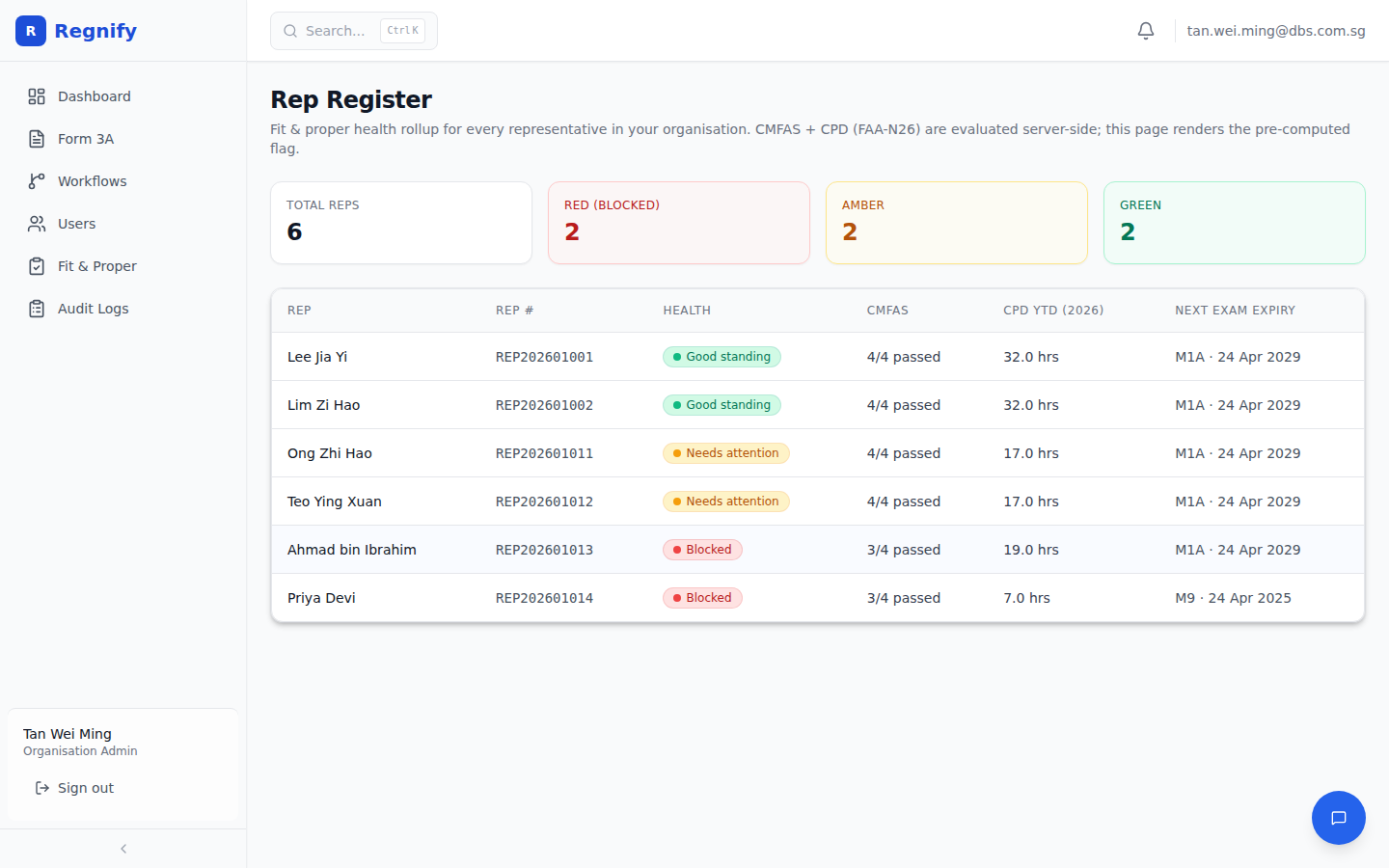 A GREEN representative row. GREEN requires all three FAA-N26 CPD minima to be met (total ≥ 30 hrs, ethics ≥ 8 hrs, product ≥ 4 hrs) and all CMFAS modules to be in passed and unexpired status. Lee Jia Yi and Lim Zi Hao both show 32 hours total — exceeding the 30-hour threshold — and carry no CMFAS gaps.
Data Freshness
The register uses Apollo's cache-and-network fetch policy. Each page load triggers a fresh query to the NestJS repProfilesWithHealth resolver, which re-runs computeRepHealth for every representative. The cached data is shown immediately while the fresh data loads, ensuring the page never shows a blank state while updating.
Compliance Officer View
Compliance Officers see the same Rep Register page as Org Admins. The view is scoped to the viewer's own organisation — a Compliance Officer at one Financial Institution cannot see representatives from another.
 The ORG_ADMIN view of the same register. The data and layout are identical to the COMP view — both roles are scoped to their own organisation and cannot see representatives from other institutions.
Recommended compliance workflow:
Daily: - Check the RED count tile on the Rep Register. Any new RED representative requires immediate action — the representative's CMFAS must be addressed before they can continue in their role.
Weekly: - Review AMBER representatives. Look for any with rapidly approaching year-end (Q4) who are significantly below their CPD targets. Use the AI assistant to draft reminder emails for those at highest risk.
Quarterly (before each attestation cycle): - Review all R/A/G counts before launching the quarterly attestation. RED representatives should have their CMFAS issues resolved before attestation — an attestation from a RED rep adds paperwork without addressing the root compliance issue. - Use the AI assistant: "Show me all AMBER representatives for this organisation."
The Admin Dashboard Health Card
A compact summary card appears on the Admin Dashboard (/dashboard) alongside other organisation metrics. It shows Total / Red / Amber / Green counts in a 4-column grid and links directly to the full Rep Register page.
The card uses the same GraphQL query as the Rep Register page (repProfilesWithHealth), so Apollo's cache means the dashboard and the register page share the same data fetch — viewing the register and then the dashboard (or vice versa) does not issue a duplicate query.
The subtitle on the card reads "CMFAS + FAA-N26 CPD rollup" — confirming the data source.
To navigate from the card to the register: Click the "View register" link in the top-right of the card.
The RepHealthBadge Component
The RepHealthBadge component (client/src/components/RepHealthBadge.tsx) is used in three locations:
1. Every row in the Rep Register table
2. The Admin Dashboard health card (as the basis for the count tiles)
3. A representative's own Passport page in the rep portal
The badge is presentational only. It takes a server-computed flag value (green, amber, or red) and an optional array of reasons strings. It renders a dot, a label, and surfaces the reasons in a browser tooltip on hover.
The component MUST NOT re-classify. It renders the server's pre-computed value and nothing else. The classification logic belongs exclusively to computeRepHealth in the NestJS service. This prevents client-side drift from the server's authoritative computation.
Using the AI Assistant with the Rep Register
The AI assistant and the Rep Register are complementary. The register gives you the table view; the AI gives you the narrative, the drill-down, and the action path.
Asking the AI for Rep Health Data
User: Show me all RED representatives in Organisation 2 and why they are blocked.
AI: (calls get_rep_register for org_id=2) Organisation 2 has 3 RED representatives: - Rep A (Rep # RN00142): CMFAS module M6A is in status "not_taken." The rep cannot conduct securities-related activities until M6A is passed. - Rep B (Rep # RN00156): CMFAS module M5 expired on 15 January 2026. Re-examination required. - Rep C (Rep # RN00178): Two modules — M1A (not_taken) and M6 (not_taken) — are required for their declared activity of Dealing in Securities.
Would you like me to draft CPD reminder emails for the AMBER representatives as well, or would you like to review the CMFAS gap details for any of these three?
Drafting CPD Reminders
User: Draft a CPD reminder for Rep Profile 22.
AI: (calls get_cpd_status, then draft_cpd_reminder) Here is the draft reminder for the representative. They have completed 18.0 of the required 30 hours, with 3.0 ethics hours (minimum: 8.0). The draft email is professional in tone, cites the annual deadline of 31 December 2026, and includes the
{PORTAL_URL}placeholder. Please review and confirm to queue for sending.
Launching a Post-Register Attestation Cycle
After reviewing the Rep Register and confirming which representatives are in active good standing (GREEN), you can ask the AI to launch the quarterly attestation cycle for those representatives:
User: Launch the Q3 2026 attestation for Organisation 2 using template 1. Include all GREEN and AMBER representatives — exclude the three RED ones.
AI: (calls get_rep_register, filters to non-RED reps, confirms count) I will launch an attestation cycle for Organisation 2, template 1, covering 9 representatives (6 GREEN, 3 AMBER; the 3 RED representatives are excluded as requested). The representatives are: [names listed]. Reply "confirm" to proceed.
The Seven Skill Playbooks
The AI assistant's behaviour for compliance-specific tasks is shaped by seven playbooks. Each is a Markdown file under services/fastapi/app/agents/skills/. The AI reads all seven at startup and applies the relevant one based on the content of your question — no routing code, no keyword matching.
1. rep/cpd-self-log — CPD Self-Log (Representative)
Use case: A representative wants to log a CPD event or certificate against their profile.
What it does: Guides the rep to upload their certificate, extracts course details automatically, checks their current CPD balance, proposes a categorised allocation (ethics / rules / product), and waits for the rep's confirmation before committing. The rep must actively confirm the category because CPD miscategorisation is the most common cause of year-end audit findings.
Proactive triggers: Fires on 1 November (60-day warning) and 1 December (30-day warning) each year for reps below the annual threshold.
2. rep/attestation-self-coach — Attestation Self-Coach (Representative)
Use case: A representative needs help answering their quarterly fit-and-proper attestation questions accurately.
What it does: Walks the rep through each attestation question one at a time, cites the FSG-G01 paragraph or SFA/FAA section motivating each question, names the evidence to have on hand, and waits for the rep's answer. It does not answer on the rep's behalf. If the rep reveals a materially adverse fact, it stops and directs them to their Compliance Officer before submission.
3. rep/passport-export-coach — Passport Export Coach (Representative)
Use case: A representative wants to share their regulatory credentials with a counterparty, client, or bank.
What it does: Generates or rotates the rep's passport export token using the generate_passport tool, provides the share URL and verification URL, explains what is and is not included in the public passport (NRIC, DOB, and residential address are excluded), and reminds the rep that each rotation invalidates previous tokens.
Privacy boundary: The passport exports only fields flagged publicOnPassport = true — licensed activities, CMFAS passes, Form 3A approval date, and principal FI name.
4. attestation/attestation-cycle-launch — Attestation Cycle Launch (Compliance Officer)
Use case: A Compliance Officer wants to start the quarterly fit-and-proper attestation cycle.
What it does: Fetches the rep roster, confirms the org, template, and rep count with the user, and only then calls launch_attestation_cycle. Always confirms before writing. Cites FSG-G01 and FAA-N26/SFA04-N22 as the regulatory basis for the cycle.
Proactive trigger: Fires on the 1st of each quarter month (January, April, July, October) at 09:00 to remind Compliance Officers to launch.
5. attestation/attestation-anomaly-detector — Anomaly Detector (Compliance Officer)
Use case: A Compliance Officer wants to check whether any attestation responses look irregular.
What it does: Calls detect_attestation_anomaly for the cycle and any rep of concern. Produces a structured findings report with severity (low / medium / high), the specific question keys that triggered concern, the verbatim response text, and a suggested next step for each finding. For high-severity findings involving criminal convictions, regulator prohibition, or bankruptcy, it appends a specific regulatory escalation: "This may trigger a Section 99D(2) / FAA s.23A(2) duty to notify MAS of a material change."
6. attestation/attestation-noncompletion-chase — Non-Completion Chase (Compliance Officer)
Use case: An attestation cycle is near its close date and some representatives have not yet submitted.
What it does: Identifies non-responders, drafts chase emails for each, presents a table of pending reps sorted by longest-pending first, and waits for the user's approval before sending any email. Any rep pending more than 21 days is separately flagged for direct Compliance Officer intervention, not automated reminders.
Proactive trigger: Fires on the 24th of each quarter-end month (March, June, September, December) at 09:00 — seven days before the typical cycle close.
7. incident/coach-incident-disclosure — Incident Disclosure Coach (Representative)
Use case: A representative needs to file an incident disclosure — a client complaint, a received gift, a conflict of interest, a regulatory investigation, or another MAS-recognised incident.
What it does: Maps the situation to one of the five recognised incident types, searches the relevant MAS Notice for the governing paragraph, helps the representative draft the narrative (what happened, when, who was involved, what mitigation has been taken), and calls create_incident_declaration after explicit confirmation. For potential fraud, insider trading, or market manipulation, it stops the self-service flow and directs the representative to speak with legal counsel before filing anything.