20 — Incident Disclosure¶
Licensed representatives have an ongoing obligation to disclose certain regulatory, disciplinary, and financial events to their principal Financial Institution. Regnify's Incident Disclosure wizard is the self-service tool for representatives to file these disclosures. Each submission creates a Declaration record that immediately notifies the relevant Compliance Officer and enters the approval workflow.
The wizard is at /rep/incidents and is a focused 3-step flow: (1) Incident type — pick from Gift received, Client complaint, Third-party report, Conflict of interest, or Other; each option carries a one-line description so the right category is obvious. (2) Narrative — free-form description of what happened, when, and any parties or amounts involved. (3) Review & submit — final read-through before filing. Once submitted, the declaration appears in the Compliance Officer's queue and starts the Form 3A approval chain just like any other declaration.
What Must Be Disclosed¶
MAS regulations require that representatives proactively disclose material changes in their personal or professional circumstances. Regnify supports five incident categories that align with the categories MAS identifies in its Guidelines and Notices:
1. Gift Received (gift_received)¶
A gift, hospitality, or benefit received from a client or counterparty.
When to disclose: when you receive any gift, entertainment, or benefit from a client or business counterparty where the value or the relationship could create a conflict of interest or a perception of impropriety. Many firms have internal thresholds (commonly S$50); gifts above the threshold typically require disclosure and may require MAS notification.
Regulatory grounding: conflicts-of-interest obligations under FAA-G04 (Recommendations on Investment Products).
2. Client Complaint (client_complaint)¶
A formal or informal complaint raised by a client.
When to disclose: when a client raises a written or verbal grievance about your advice, conduct, or services — whether or not you believe the complaint has merit. This includes complaints handled through your firm's internal complaints process as well as complaints directed to MAS or the Financial Industry Disputes Resolution Centre (FIDReC).
Regulatory grounding: the complaints handling regime under FAA-G04; dispute resolution obligations under SFA04-N11 (Notice on Business Conduct).
3. Third-Party Report (third_party_report)¶
A regulator, auditor, or external party has raised concerns about you.
When to disclose: when MAS, a foreign regulator, an external auditor, or another official body has contacted you as a subject of enquiry, issued a finding relating to your conduct, or raised concerns about your business activities.
Regulatory grounding: FSG-G01 §§ on ongoing fitness; the duty to notify under SFA s.99D(2) / FAA s.23A(2) for material changes in circumstances.
4. Conflict of Interest (conflict_of_interest)¶
An actual or potential conflict between your personal interests and your clients' interests.
When to disclose: when you become aware of a situation where your personal financial interests, business relationships, or activities could conflict — actually or potentially — with the interests of clients or your employer. This includes undisclosed secondary employment, personal investments in client accounts, or receipt of commissions not disclosed to clients.
Regulatory grounding: FSG-G01 financial soundness and conflict-of-interest criteria; FAA-N26 / SFA04-N22 on notification of particulars changes.
5. Other (other)¶
Any event not covered by the four categories above.
When to disclose: use this category for events that are material to your fitness and propriety but do not fit neatly into the first four categories. Examples include material changes in your financial standing, late CPF contributions that indicate financial distress, personal bankruptcy proceedings, or other events that your Compliance Officer would reasonably expect to know about.
Accessing Incident Disclosure¶
Route: /rep/incidents
In the Rep Portal, click Incident Disclosure in the top navigation bar.
The wizard has three steps: Incident type → Narrative → Review & submit.
The Three-Step Disclosure Wizard¶
A progress bar at the top shows the three steps. Completed steps show a green checkmark. The current step is highlighted in the primary colour.
Step 1: Incident Type¶
Select the category that best describes what happened. The five options are displayed as selectable cards with a description to help you identify the right category.
You can select exactly one type. Once selected, click Next to proceed.
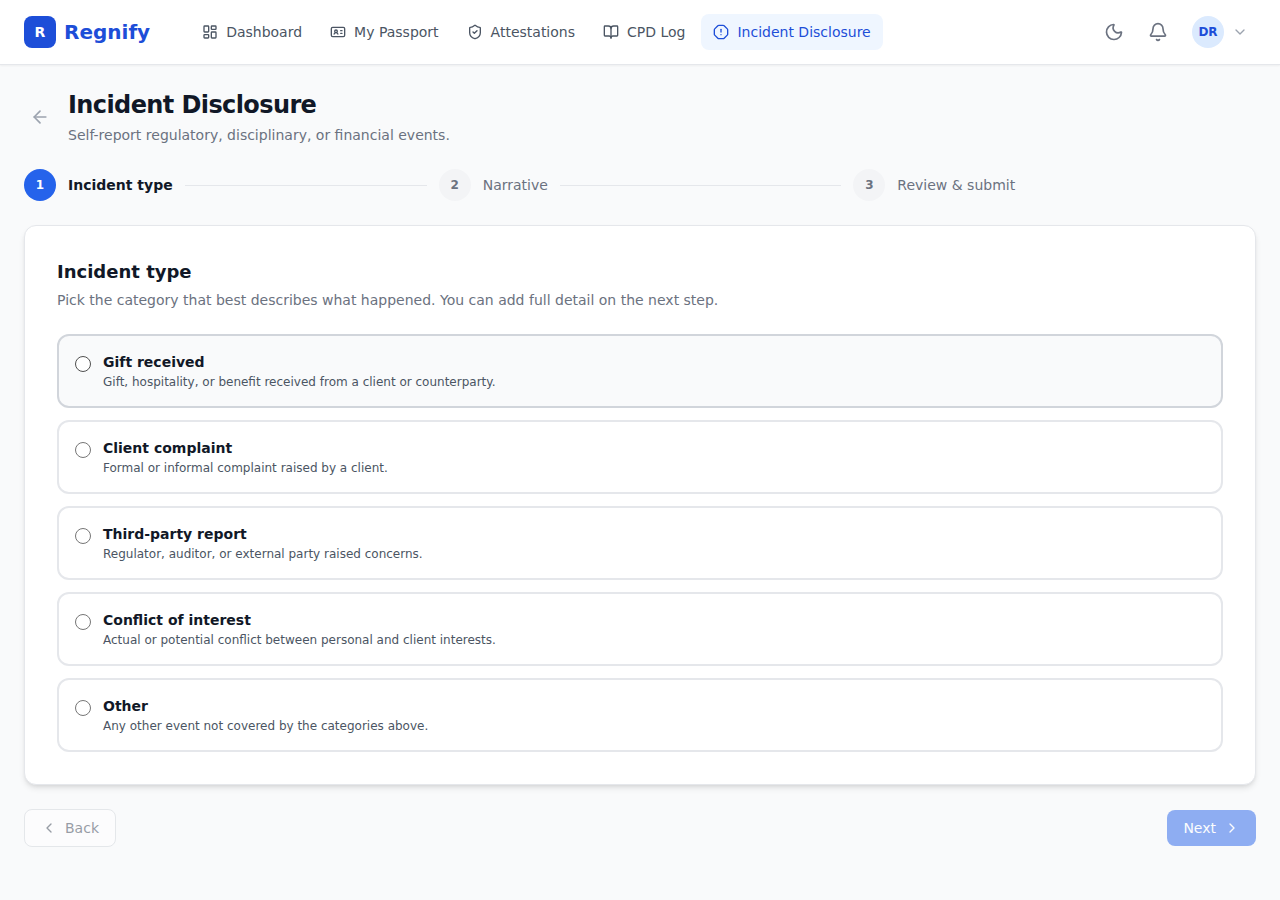 Step 1: five radio cards for selecting the incident type — Gift received, Client complaint, Third-party report, Conflict of interest, Other. Each card shows a one-line description to help identify the correct category.
Tip: if you are unsure which category applies, ask the AI assistant before starting the wizard. The AI will ask you clarifying questions and map your situation to the correct category based on the MAS Notice that governs the disclosure obligation. Do not guess — the category affects how your compliance officer classifies and escalates the disclosure.
Step 2: Narrative¶
Write a clear, complete description of the incident.
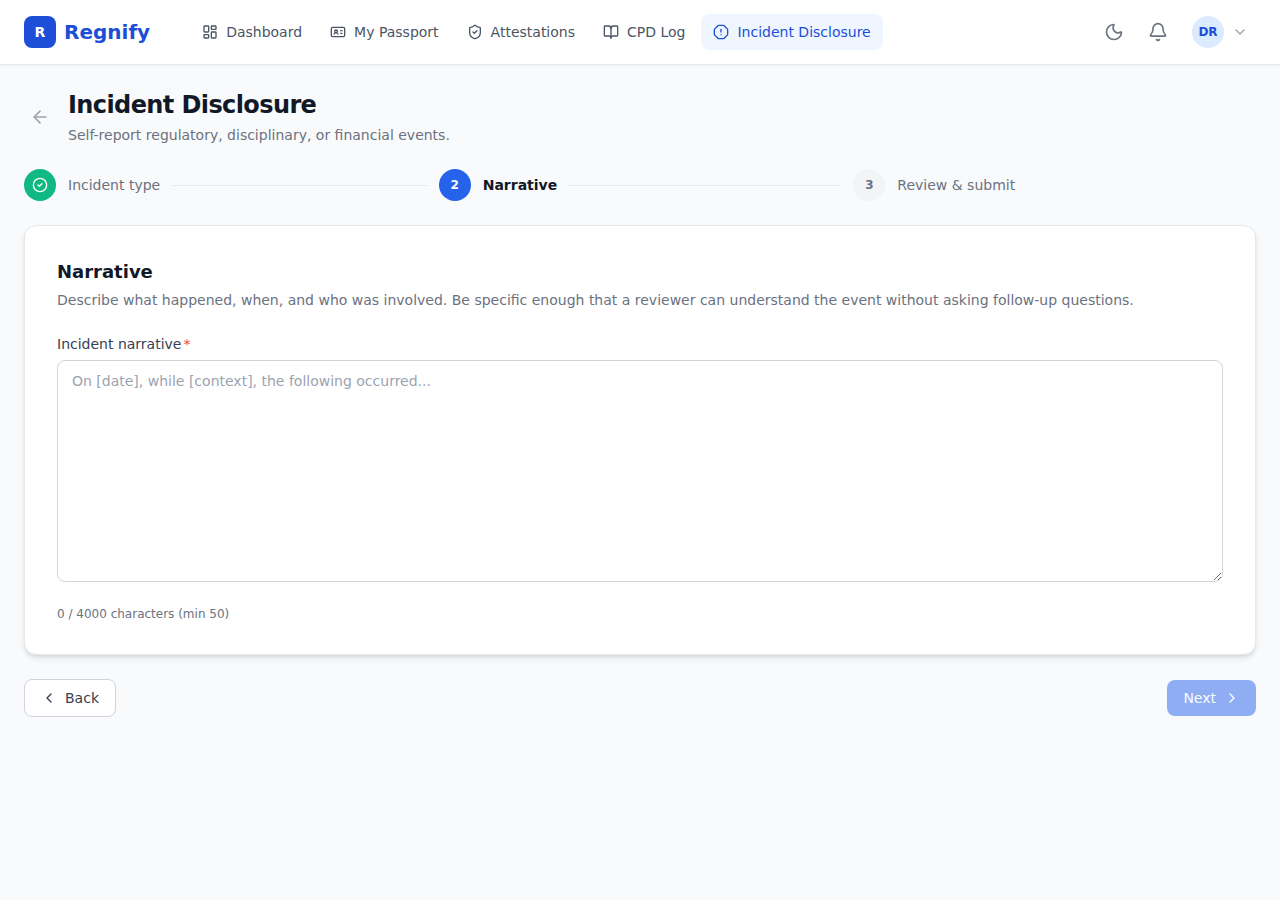 Step 2: the narrative text area with a live character counter ("0 / 4000 characters (min 50)"). The placeholder text guides the structure of a compliant disclosure.
The narrative field has the following constraints:
| Constraint | Value |
|---|---|
| Minimum length | 50 characters |
| Maximum length | 4,000 characters |
A live character counter shows your current length and warns you if you are below the minimum or above the maximum.
The placeholder text guides the structure: "On [date], while [context], the following occurred..."
Write with enough specificity that a reviewer can understand the event without asking follow-up questions. A good narrative covers:
- What happened
- When it happened
- Who was involved
- What has already been done to address or mitigate the situation
- What further action is planned
Once you have written at least 50 characters, click Next to proceed.
Step 3: Review and Submit¶
The review step shows:
- Incident type — the category you selected in step 1
- Narrative — your written description from step 2 (shown as-is; preserve line breaks and formatting)
- Reported at — a datetime-local input that defaults to the current date and time in your local timezone. Adjust this if the incident occurred earlier than now.
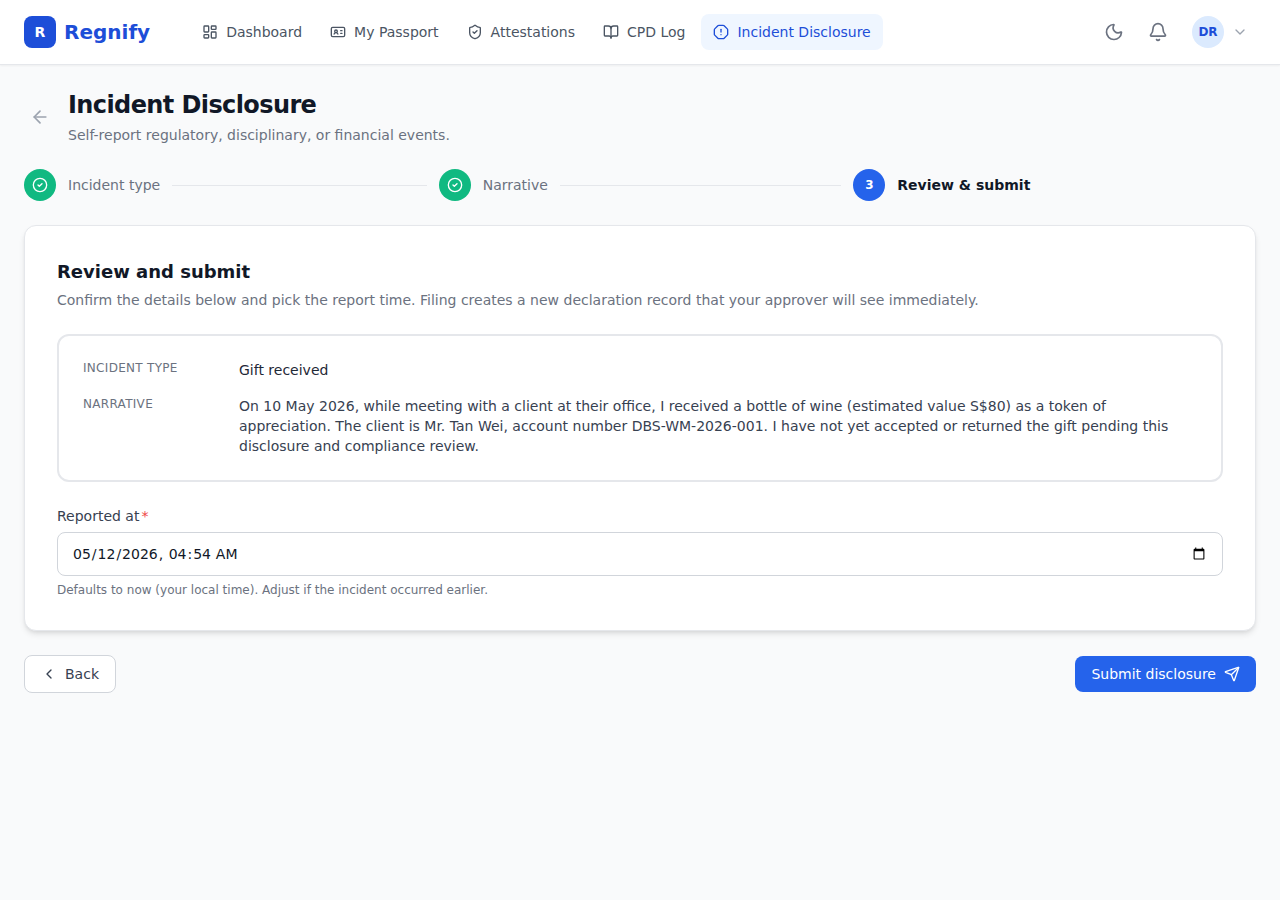 Step 3: the review screen showing INCIDENT TYPE (Gift received), NARRATIVE (a 290-character description of a wine gift received from a client), Reported at datetime, and the Submit disclosure button.
Review all three fields. If anything needs correction, click Back to return to the earlier step.
When everything is accurate, click Submit disclosure.
If submission fails (network error, validation error), the error message is shown in a red alert box. Try again, or contact your Compliance Officer if the issue persists.
After Submission¶
A successful submission shows a green confirmation screen with:
- "Declaration #[ID] created"
- The incident type you selected
- A note that you will be notified when a reviewer takes action
- A link to View declaration — which opens the full declaration in the main declarations view
- A Back to portal button to return to the Rep Portal dashboard
What happens next:
- A Declaration record is created with formType = DECLARATION_INCIDENT_DISCLOSURE
- The approval workflow is kicked off automatically, routing the disclosure to your compliance officer
- Your Compliance Officer is notified within the next worker cycle (typically under 5 minutes)
- You will receive a notification when the Compliance Officer reviews the disclosure
Viewing Past Disclosures¶
Past incident disclosures appear in your declarations list at /declarations. Each submitted incident disclosure shows as a declaration with form type DECLARATION_INCIDENT_DISCLOSURE. You can view the status, the incident type, and the narrative from the declaration detail page.
A dedicated view of past disclosures within the Rep Portal is on the roadmap.
AI Incident Assistance¶
The AI assistant is trained on the Incident Disclosure Coach playbook. It is particularly useful when:
- You are unsure whether an event needs to be disclosed at all
- You are unsure which of the five categories applies
- You need help writing a thorough, compliant narrative
- You want to understand the specific MAS Notice that governs your situation
Example: Gift from a Client¶
You received a bottle of wine from a grateful client:
"I received a gift from a client — a bottle of wine worth about S$80. Do I need to disclose it?"
The AI will:
1. Search the MAS knowledge base for the relevant regulatory obligations
2. Explain the conflict-of-interest framework under FAA-G04
3. Advise that S$80 likely exceeds common internal thresholds and may require disclosure
4. Help you draft a narrative covering what was received, when, from whom, and whether it was accepted or returned
5. Assist you in selecting the gift_received category and submitting the disclosure
Example: Customer Complaint¶
"A client called and complained about the suitability of a product I recommended. Help me write up the disclosure."
The AI will classify this as a client_complaint, cite the complaints handling obligations under FAA-G04 and SFA04-N11, and help you structure a narrative covering what the client alleged, when the call occurred, what your initial response was, and what remedial action is planned.
Escalation Cases¶
For certain situations, the AI will stop the self-service flow and direct you to speak with your Compliance Officer before filing anything:
-
Fraud, insider trading, or market manipulation — the AI will say: "This rises above a routine incident disclosure. You should speak to your Compliance Officer and your firm's legal counsel before filing anything via this surface. The wording of a misconduct disclosure under SFA04-N12 can materially affect the subsequent investigation and your personal position."
-
Filing on behalf of another representative — incident disclosures under SFA04-N12 are filed by the principal FI (via COMP / HR_ADMIN), not by peer representatives. The AI will redirect you to your Compliance Officer.
The AI also reminds you at the end of every disclosure coaching session: evidence related to the incident must be retained for at least 5 years per the SFA04-N13 record-keeping obligations. Do not discard trade tickets, emails, or client correspondence related to the incident.
MAS Reporting Thresholds¶
Some incident types trigger an obligation for the principal FI to notify MAS directly, not just to record the disclosure internally. The AI can advise on specific thresholds, but as a general guide:
- Criminal convictions, bankruptcy, or regulator prohibitions — almost always trigger the SFA s.99D(2) / FAA s.23A(2) duty to notify MAS of a material change in circumstances. Escalate immediately.
- Client complaints resulting in FIDReC referral — may require internal tracking and aggregate reporting.
- Gifts above firm-defined thresholds — internal disclosure only in most cases; the Compliance Officer decides whether MAS notification is warranted.
If your Compliance Officer has not been notified within 1 business day of you filing an incident disclosure, follow up directly.