19 — CPD Log (self-logging external CPD)¶
Looking for the full picture? This page covers the self-log workflow — recording external / off-platform CPD. For the complete CPD & Learning guide (courses, assessments, certificates, compliance actions, and how hours are credited), see 23 — CPD & Learning (the CPD LMS).
Continuing Professional Development (CPD) is a mandatory ongoing obligation for every licensed representative under MAS regulations. Most CPD in Regnify is earned automatically by completing accredited courses in the built-in LMS. The CPD Log at /rep/cpd/log is where you additionally self-log CPD you completed elsewhere (an external webinar, an industry conference, a firm workshop) and review your itemised register.
CPD requirements (FAA-N26 §5.4 / SFA 04-N22 §8.4)¶
Requirements are scope-dependent (both instruments effective 1 April 2024 — FAA-N26 superseded FAA-N13; SFA 04-N22 superseded SFA 04-N09):
| Scope | Total / cycle | Core (accredited) | Supplementary |
|---|---|---|---|
| FA (Full) | 30 h | 6 h | 24 h |
| FA (Limited) | 16 h | 6 h | 10 h |
| CMS | 9 h | 6 h | 3 h |
Core hours are ethics or rules-&-regulations topics; they count toward the Core minimum only if accredited — IBF/SCI/CPF Board for FA reps, IBF only for CMS reps. Unaccredited core-topic hours spill into Supplementary.
- The cycle year runs 1 January – 31 December; hours do not carry forward.
- Records are retained ≥ 5 years (electronic record-keeping obligation), satisfied by Regnify's persistent log.
- First-year appointees are exempt for their partial first year; partial years pro-rate the target (never earned hours).
Terminology note. Regnify uses the MAS Core / Supplementary + accreditation model. An earlier "Ethics / Product / Other" split (e.g. "8 h ethics + 4 h product") is retired — see 23 — CPD & Learning §1 for the authoritative requirements.
Reading your CPD Log¶
The page shows the accreditation-gated YTD totals — Core (accredited), Supplementary, Total — which match your CPD dashboard exactly (both read the same server-computed figures). Below the totals, the CPD Log History table lists every itemised record: course/activity name, accreditation code (if any), provider, date completed, category, source (course vs manual) and hours.
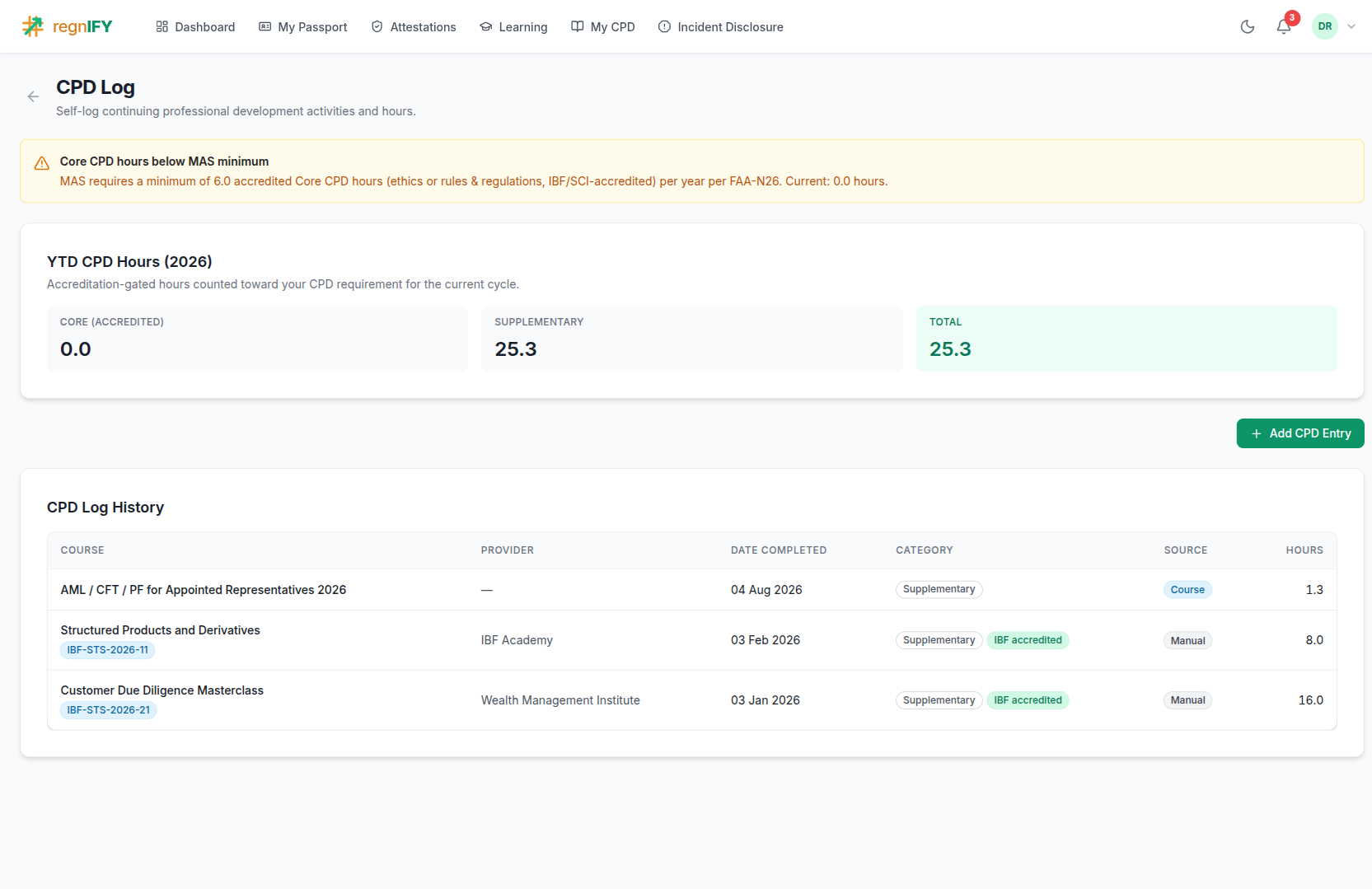 The itemised CPD register: YTD totals on top (Core / Supplementary / Total), then each record. Records sourced from a revoked certificate are excluded here, so the itemised list can never disagree with the aggregate totals.
The Total shown is the representative's true earned total (cpdHoursYtd) — it is deliberately not the sum of the two meters, because accredited Core hours beyond the 6 h minimum overflow into the Supplementary pool, and summing the meters would double-count them.
Adding a self-logged CPD entry¶
Click Add CPD Entry and complete the form:
| Field | Required | Notes |
|---|---|---|
| Cycle Year | Yes | Defaults to the current year; can be set to a prior year. |
| Course / activity name | Yes | The title of the course, webinar, workshop or event. |
| Provider | No | The training provider (IBF, an industry body, your firm's L&D team, …). |
| Category | Yes | Core or Supplementary. |
| Hours | Yes | The CPD hours, in 0.5-hour increments; must be greater than zero. |
| Date completed | Yes | The completion date (drives the cycle year the record counts against). |
| Accreditation reference | No | The provider's reference, e.g. IBF-CPD-12345. Recorded as evidence, not as a claim — entering one does not make the record accredited. |
| Evidence | No | A certificate or attendance record (PDF/image). Uploaded first, so the CPD record carries its document id; a compliance officer verifying the entry can open it. |
Accreditation is not self-serviceable. A self-logged entry is always recorded as unaccredited — it counts as Supplementary and does not satisfy the Core minimum. This is a deliberate control: crediting statutory Core hours with no verification would feed a fabricated Fit & Proper record. To have an external activity recognised as accredited Core, ask your Compliance Officer to add or verify the record on your behalf (they have an "Add CPD record" action with an accreditation option — see 23 — CPD & Learning §5).
On submit, a success toast confirms and the YTD totals refresh.
AI assistance¶
The Rep Portal AI assistant is trained on the CPD playbook. It can:
- Check your balance — "How many CPD hours do I have this year?" calls
get_cpd_statusand returns your scope-branched Core / Supplementary / Total standing and the exact remaining gap to 31 December. - Draft reminders — the platform proactively drafts CPD reminders as the cycle-close approaches (via the
draft_cpd_remindertool); these are reviewed before being sent and state your current hours and remaining gap.
The AI never writes a CPD record without your explicit confirmation, and it will not credit accredited Core hours on a self-log (only compliance can).
For the full learner journey (catalog → lessons → assessment → certificate), the authoring and compliance surfaces, verifiable certificates, and the security/multi-org model, see 23 — CPD & Learning (the CPD LMS).