22 — Security and Privacy
Regnify is designed from the ground up for regulated financial environments. This section explains how your identity is protected, what data is stored, who can see it, and the controls in place to keep that data secure.
Service-to-service auth (X-Service-Token). Internal calls between Regnify backends — for example, when the public passport export endpoint needs to look up your compliance data to render a signed PDF — never carry a user JWT. They authenticate with a backend-only shared secret (SERVICE_INTERNAL_TOKEN, 32 random bytes) that is only present on the regnify-secrets Kubernetes secret distributed to the FastAPI and NestJS pods. Possession of the token implies trusted-backend identity (equivalent to admin) for inter-service work; it never leaves the cluster, and it is rotated by simultaneously redeploying both backends with a new value. The public passport URL itself remains a UUIDv4 share-link (122 bits of entropy, statistically unguessable) — that is the auth that recipients hold; the cross-service token is only used internally.
Passport signing. Each exported passport PDF carries an Ed25519 digital signature over a JSON manifest of the rep's compliance state at the moment of export. Counterparties can verify the signature with the published public key to confirm the document hasn't been altered since issue. The private signing seed (PASSPORT_SIGNING_KEY) is stored only in the cluster secret store and is never exposed via any API.
Authentication
Keycloak Single Sign-On
Regnify does not manage usernames or passwords directly. All authentication is handled by Keycloak, an open-source identity provider trusted by enterprises and governments worldwide. Your credentials exist only inside Keycloak — Regnify never stores, transmits, or logs your password.
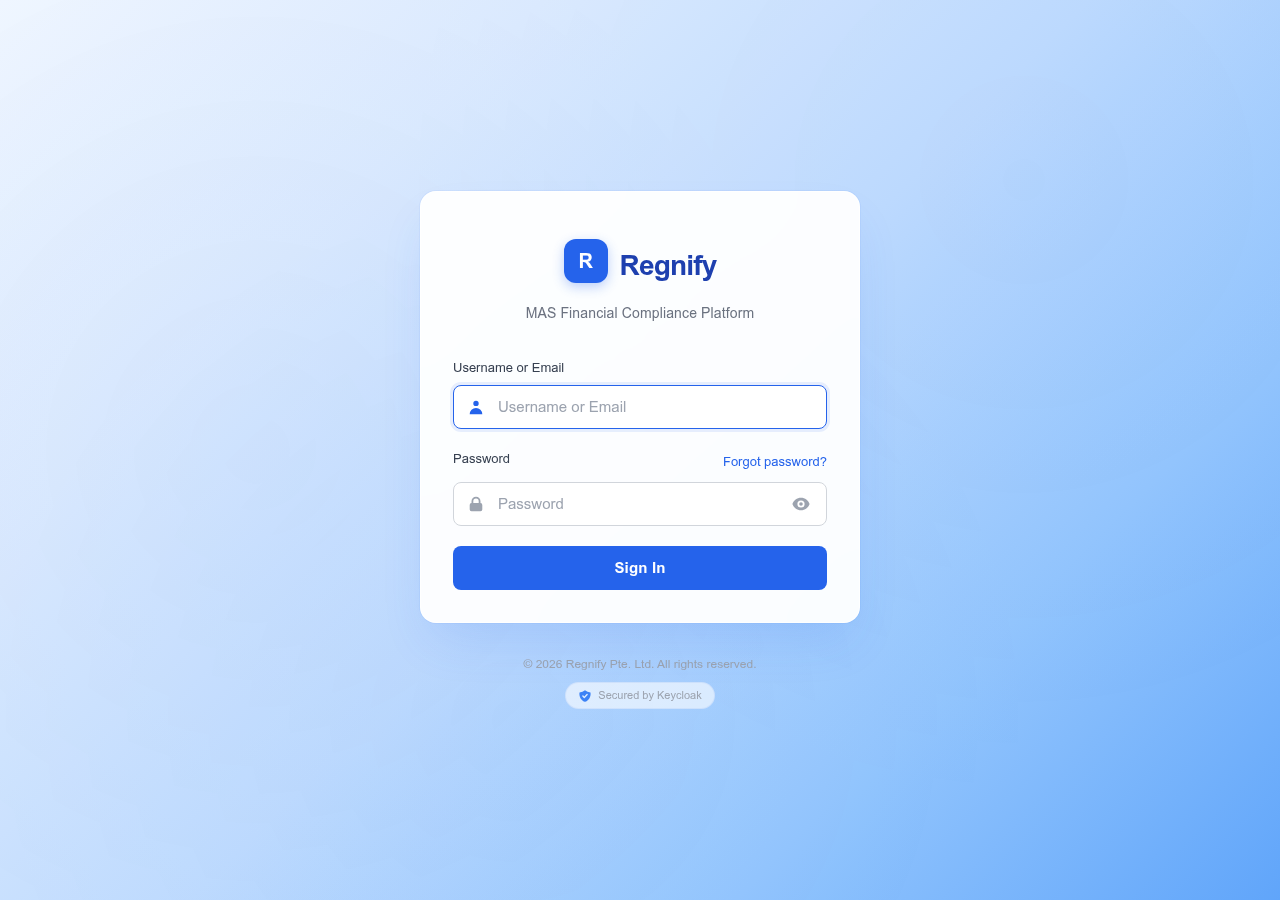 The Keycloak-hosted login page. Regnify redirects here automatically; your credentials are handled entirely by Keycloak and never seen by the application.
OIDC PKCE Flow
When you open Regnify, the application immediately redirects you to the Keycloak login page. After you authenticate, Keycloak issues a short-lived access token using the OpenID Connect Authorization Code flow with PKCE (Proof Key for Code Exchange), S256 method. PKCE is an industry-standard mechanism that prevents token interception attacks — even if a malicious script intercepts the authorisation code, it cannot exchange the code for a token without the secret that lives only in your browser.
The token returned to Regnify is a signed JWT (RS256). Both the NestJS and FastAPI backends independently validate this token's signature against Keycloak's public key on every API request. No session cookies are used for authentication.
Token Lifetime and Auto-Refresh
Access tokens have a 24-hour expiry configured in the Keycloak realm. The frontend silently refreshes your token every 10 seconds (checking whether it has less than 30 seconds of validity remaining). If a refresh attempt fails — for example, because your Keycloak session has been terminated by an administrator — you are automatically redirected to the login page. No data is lost from completed operations.
Manual Sign Out
To sign out, click Sign out at the bottom of the left-hand sidebar. This removes your access token from browser storage and instructs Keycloak to terminate your session. You are then redirected to the login page.
Multi-Factor Authentication
Multi-factor authentication (MFA) is supported through Keycloak. Whether MFA is required for your account depends on your organisation's Keycloak configuration. Contact your platform administrator if you wish to enable or enforce MFA for your users.
Single Sign-On Federation
If your organisation operates its own identity provider (Active Directory, LDAP, or another OIDC/SAML provider), Keycloak federation allows users to log in with existing corporate credentials. Ask your platform administrator whether federation is configured for your organisation.
Password Policy
Keycloak enforces the following password policy for all accounts in the Regnify realm:
| Requirement | Rule |
|---|---|
| Minimum length | 8 characters |
| Uppercase letters | At least 1 |
| Lowercase letters | At least 1 |
| Digits | At least 1 |
| Special characters | At least 1 |
Safe special characters: Use @, #, -, _, or .. Avoid $, !, and backticks — these characters can be corrupted by certain shell environments if an administrator is scripting a password reset.
Brute-force protection is enabled in Keycloak. Repeated failed login attempts will temporarily lock an account.
Resetting a Forgotten Password
On the Keycloak login page, click Forgot Password. Enter your registered email address and Keycloak will send a time-limited reset link. Follow the link to set a new password that meets the policy above.
Administrator Password Reset
Platform administrators and organisation administrators can reset a user's password via the Keycloak admin console (/keycloak/admin/) or via the Keycloak Admin REST API. After a reset, the user is typically prompted to set a new password on their next login, depending on how the reset was performed.
Role-Based Access Control
Regnify uses six roles. Your role is assigned by an administrator and encoded directly in your Keycloak token. The frontend enforces role boundaries at the routing level (unauthenticated navigation attempts are redirected) and the backend enforces them independently on every GraphQL resolver.
Role Definitions
| Role | Description |
|---|---|
SYS_ADMIN |
Platform super-administrator. Full access to all features and all organisations. |
ORG_ADMIN |
Organisation administrator. Manages users, workflows, and data within their own organisation. |
HR_ADMIN |
HR administrator. Manages workflow templates and the rep register within their organisation. |
COMP |
Compliance officer. Reviews declarations for MAS submission, manages attestation cycles, and views the rep register. |
FI_USER |
Financial institution user. Covers both non-approver representatives (who file and submit Form 3A declarations) and approver users (supervisors, managers, CEOs with is_approver = true who review declarations in the workflow); has access to Fit & Proper checks. |
REP_USER |
Licensed representative. Has access only to the Rep Portal — a separate, isolated view of their own profile, CPD records, attestations, and passport. |
Navigation menus are filtered by role at runtime — users only see the pages they are permitted to visit.
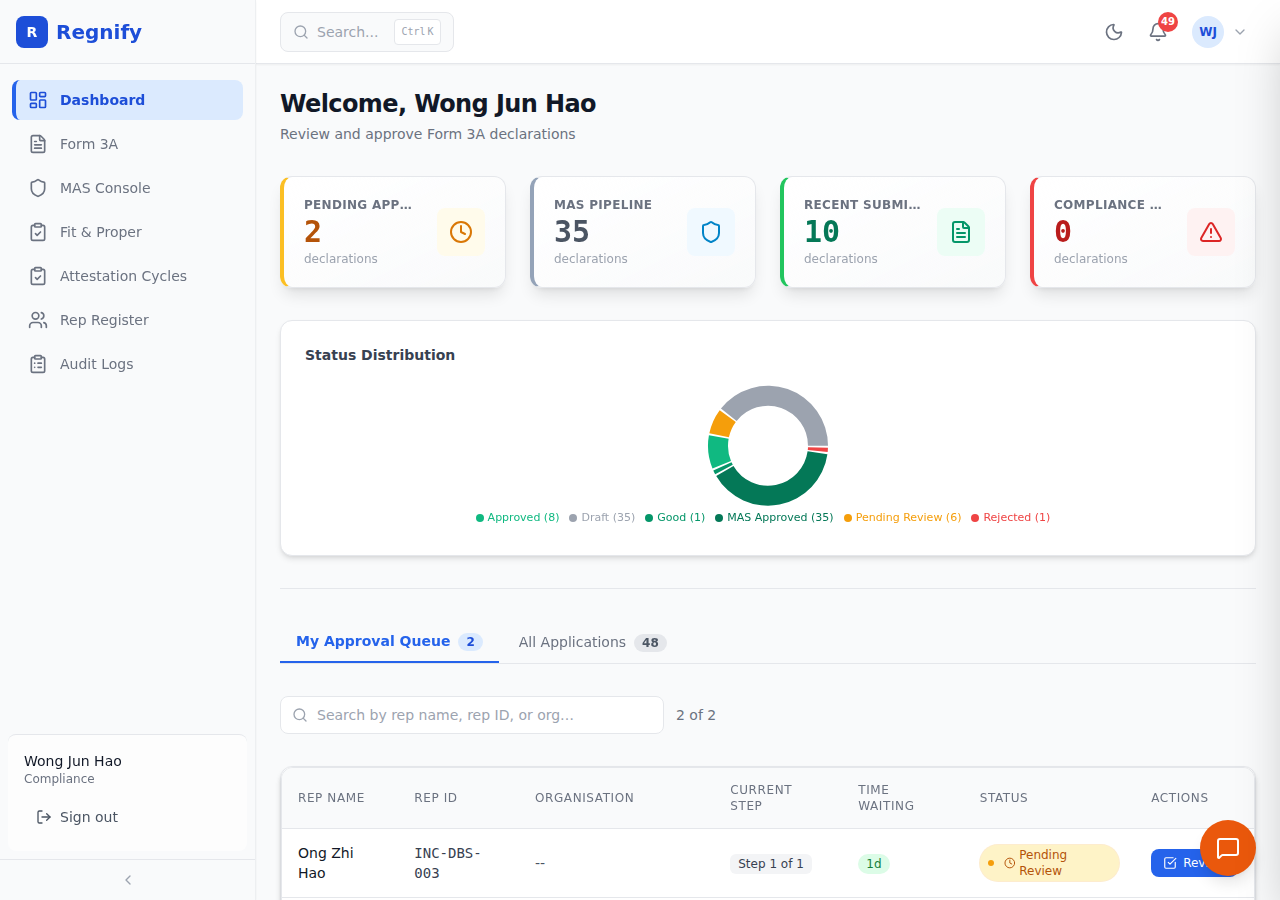 The COMP (Compliance Officer) sidebar — Dashboard, Form 3A, MAS Console, Fit & Proper, Attestation Cycles, Rep Register, Audit Logs. Workflows, Users, and Organisations are not accessible to this role.
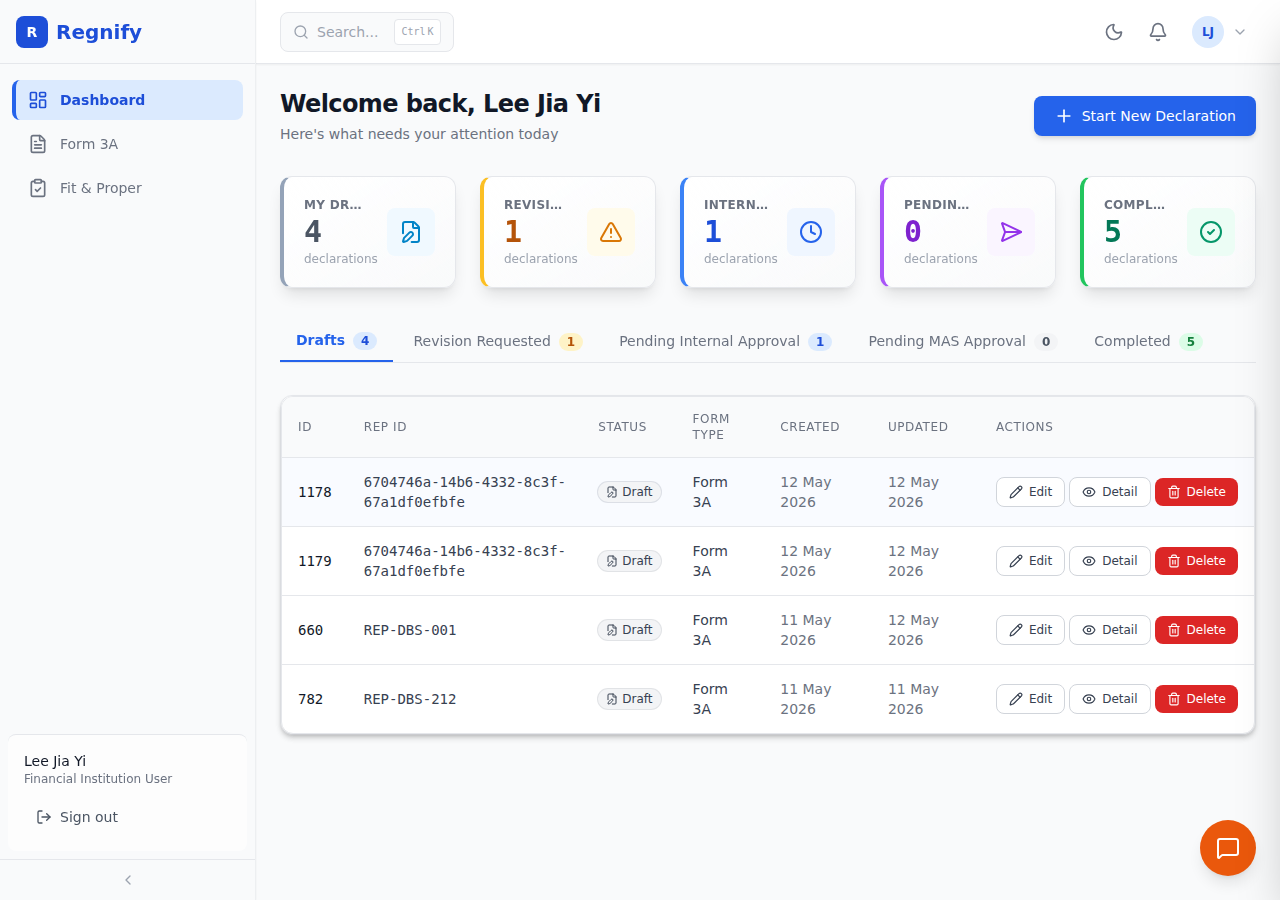 The FI_USER (Financial Institution User) sidebar — Dashboard, Form 3A, and Fit & Proper only. All administrative and MAS features are hidden.
Feature Access Matrix
The table below reflects the route-level access control enforced in the application. "Yes" means the role can access the feature; "No" means the route is blocked and the user sees an "Access Denied" message.
| Feature / Page | SYS_ADMIN | ORG_ADMIN | HR_ADMIN | COMP | FI_USER | REP_USER |
|---|---|---|---|---|---|---|
| Dashboard | Yes | Yes | Yes | Yes | Yes | No (uses Rep Portal) |
| Form 3A (new / edit) | Yes | Yes | Yes | Yes | Yes | No |
| Declaration detail | Yes | Yes | Yes | Yes | Yes | No |
| Workflow approval | Yes | Yes | Yes | Yes | Yes | No |
| Workflow management | Yes | Yes | Yes | No | No | No |
| User management | Yes | Yes | No | No | No | No |
| Organisation management | Yes | Yes | No | No | No | No |
| Audit logs | Yes | Yes | No | No | No | No |
| MAS Approval Console | Yes | No | No | Yes | No | No |
| MAS Declaration details | Yes | No | No | Yes | No | No |
| Fit & Proper | No | No | No | No | Yes | No |
| Attestation Cycle admin | Yes | Yes | Yes | Yes | No | No |
| Rep Register | Yes | Yes | Yes | Yes | No | No |
| Rep Portal (all pages) | No | No | No | No | No | Yes |
Note on organisation boundaries:
ORG_ADMIN,HR_ADMIN,COMP, andFI_USERcan only access data belonging to their own organisation. Cross-organisation data access is restricted toSYS_ADMIN.Note on Organisation Management access:
ORG_ADMINcan navigate to the Organisation Management page and view organisation details. OnlySYS_ADMINcan create or delete organisations. TheORG_ADMINsidebar does not show the Organisation Management link by default; it is accessible via direct URL (/organisations).Note on declaration visibility:
FI_USERapprovers can see declarations routed to them for approval. Representatives can only see their own declarations.
Data Privacy and PII Protection
What Data Regnify Stores
Regnify stores the following categories of data:
- User accounts: Name, email, username, Keycloak user ID, organisation membership, role.
- Declarations: Form 3A submission data including personal details, regulatory disclosures, and activity records.
- Supporting documents: Files uploaded as part of a declaration (stored in S3-compatible object storage).
- Workflow records: Approval chain state, step-by-step approver decisions and comments.
- Rep profiles: Licensed representative profiles including Capital Markets and Financial Advisory Services (CMFAS) module status, Continuing Professional Development (CPD) records, exam attempts, and reminder schedules.
- Audit logs: A permanent record of every action performed by every user and every AI operation.
- Chat history: Conversations with the AI compliance assistant, stored per session.
PII Masking in AI Responses
When the AI compliance assistant retrieves a declaration, all personally identifiable fields are automatically masked before the data enters the AI model's context. The AI never sees raw PII — masking happens server-side in chatbot_tools.py at the tool boundary, not in the frontend display layer.
The masking rules applied to declaration formData are:
| Field type | Fields affected | Masked format | Example |
|---|---|---|---|
| NRIC (National Registration Identity Card) / FIN (Foreign Identification Number) / Passport | nric, nric_number, passport, passport_number, name_nric_passport |
First and last character only | S****C |
| Phone / Mobile | phone, phone_number, mobile, mobile_number, contactNumber |
Last 4 digits only | ****1234 |
| Date of birth | dob, date_of_birth, dateOfBirth |
Year only | 1985-**-** |
These masking rules cover both snake_case and camelCase field variants defensively, so a field rename cannot silently expose PII.
This masking is a structural transformation on fields whose shape is specified by the Form 3A data contract — it is not a semantic decision and does not use language model inference.
Access Respects Your Role
The AI assistant cannot retrieve or display data that your role does not permit you to see. The assistant's data access is mediated through the same GraphQL API that the frontend uses, so the same organisation boundary checks and role guards apply.
Audit Trail
Every action in Regnify — by every user and every AI tool call — is recorded in the audit log. Audit entries cannot be deleted; this is a compliance requirement.
What Each Entry Records
| Field | Description |
|---|---|
id |
Unique log entry identifier |
userId |
Regnify database ID of the user who acted |
userName |
Display name of the acting user |
organisationId |
Organisation the user belongs to |
organisationName |
Display name of the organisation |
action |
Action type (one of 48 defined action constants) |
entityType |
The kind of record affected (e.g. Declaration, User, WorkflowStep) |
entityId |
Identifier of the specific record affected |
metadata |
Structured JSON with action-specific details (e.g. old/new status, approver comment) |
ipAddress |
Client IP address when available |
userAgent |
Browser or API client user agent string |
createdAt |
UTC timestamp of the action |
Viewing Audit Logs
Users with the SYS_ADMIN or ORG_ADMIN role can view audit logs at Audit Logs in the left-hand navigation (/audit-logs). Organisation administrators see only logs for their organisation. System administrators see all logs across all organisations.
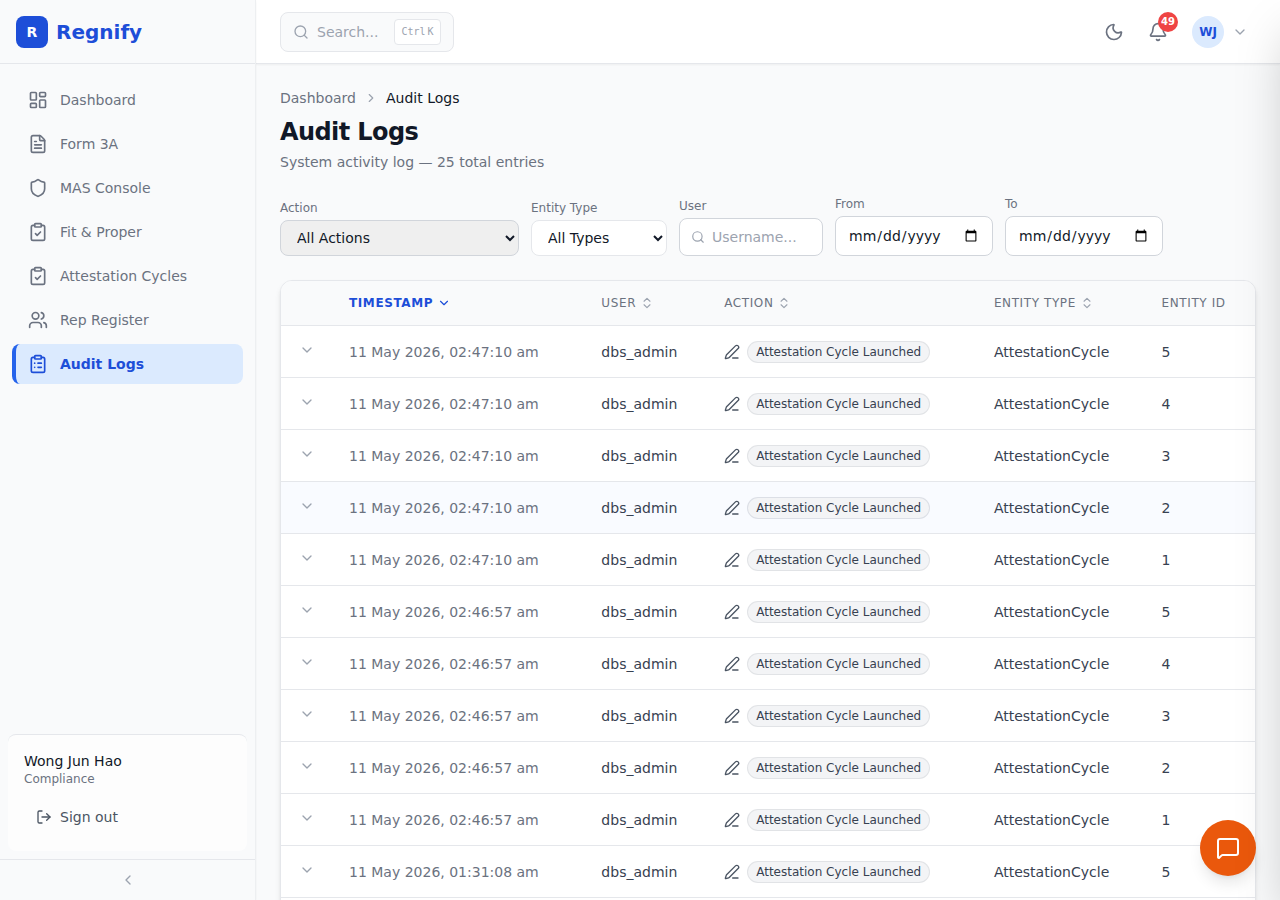 The Audit Logs page — a filterable, paginated list of every action performed on the platform, including human actions and AI tool calls.
Each entry can be expanded to reveal the full structured JSON metadata recorded with it.
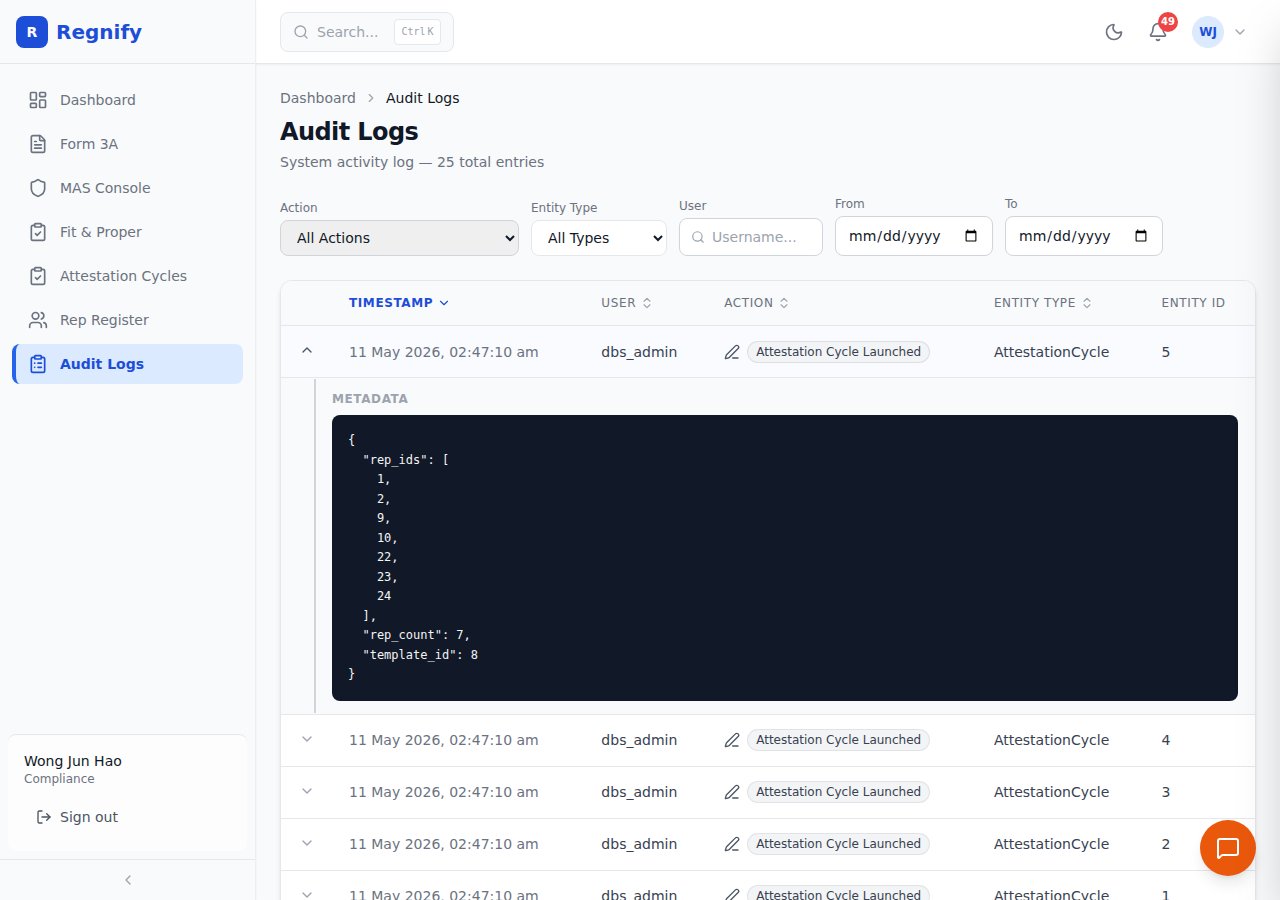 An expanded audit log entry showing the JSON metadata field — includes action-specific details such as the old and new status, approver comment, and any entity identifiers involved.
Session Management
Session Duration
Your session lifetime is determined by the Keycloak realm configuration. Access tokens have a 24-hour expiry. The frontend refreshes tokens automatically while you have the application open and your Keycloak session is still valid.
Automatic Logout on Token Expiry
If your token cannot be refreshed — for example, if an administrator terminates your Keycloak session, or if your access token expires while you have the browser closed — you will be redirected to the Keycloak login page automatically on your next interaction with the application.
Protecting Unsaved Form Work
Form 3A auto-saves your progress as a Draft every 30 seconds. If your session expires mid-form, your work up to the last auto-save is preserved. When you log back in, you can resume from your saved Draft.
Manual Sign Out
Click Sign out at the bottom of the left-hand sidebar. The access token is removed from browser storage and your Keycloak session is terminated. You are redirected to the login page.
Data Isolation
Organisation Boundaries
Regnify enforces strict organisation-level data isolation at the backend. Users assigned to Organisation A cannot see declarations, workflow instances, users, or audit logs belonging to Organisation B. This is enforced on every database query, not only in the frontend. The sole exception is SYS_ADMIN, which has platform-wide visibility by design.
Representative Visibility
A FI_USER approver can see all declarations routed to them through the workflow chain. They cannot see declarations belonging to other representatives outside that chain. Representatives using the REP_USER role in the Rep Portal see only their own profile, declarations, CPD records, attestations, and incidents.
Rep Portal Isolation
The Rep Portal (/rep/*) is a separate application area with its own navigation and layout. It is accessible only to REP_USER accounts. Users in any other role who attempt to access /rep/* URLs are blocked at the route level and redirected.
Document Security
Supporting documents (PDFs, scanned forms) attached to declarations are stored in S3-compatible object storage. Documents are never publicly accessible.
Access to documents is controlled via signed URLs — time-limited, user-specific URLs generated on demand by the backend. A signed URL for a document is only issued to a user who has permission to view the associated declaration. The URL expires after a short period; sharing the URL with another person will not grant them lasting access.
AI Security Considerations
No Raw PII in AI Context
As described in the Data Privacy section, all PII fields in declaration data are masked server-side before reaching the AI model. The AI compliance assistant is architecturally prevented from seeing raw NRIC numbers, passport numbers, phone numbers, or unmasked dates of birth.
AI Actions Require Confirmation
The AI assistant does not silently modify data. Write operations initiated through the AI (such as launching an attestation cycle or creating an incident declaration) are surfaced to you for explicit review and confirmation before they are executed. The AI drafts; you approve.
All AI Actions Are Logged
Every data access and write operation performed by the AI tools is captured in the audit log under the acting user's identity. There is no separate or hidden AI action log — AI operations are auditable alongside human operations.
AI Cannot Exceed Your Permissions
The AI assistant's tool calls pass through the same authenticated GraphQL API that the frontend uses. Your role and organisation membership are encoded in your access token, and the backend enforces the same access rules regardless of whether a request originates from the UI or from an AI tool call.
Reporting Security Issues
If you discover a security vulnerability or data privacy concern in Regnify, report it to your platform administrator immediately. When reporting, include:
- A clear description of the issue
- Steps to reproduce the behaviour
- Your assessment of the potential impact
Do not attempt to exploit a discovered vulnerability or share details publicly before the platform team has had an opportunity to investigate and remediate.